RoboForm vs Bitwarden comparison in 2026

RoboForm and Bitwarden are two trusted password managers that cover the essentials well – strong encryption, multi-factor authentication, and useful features for everyday password management. However, Bitwarden stands out for its open-source approach and generous free plan, while RoboForm focuses more on convenient autofill and form filling.
I tested both password managers over several weeks, assessing their security, ease of use, customer support, and overall value. This hands-on testing helped me see where each provider performs best and how they compare in 2026.
In this RoboForm vs Bitwarden comparison, I share my first-hand experience and break down their key differences to help you decide which password manager better fits your needs.
RoboForm vs Bitwarden – overview
RoboForm and Bitwarden are both secure, AES-256–encrypted password managers with strong core protection and zero-knowledge architecture, but they take different approaches to usability and control. RoboForm focuses on simplicity, offering a more polished interface, smoother autofill, more accessible customer support, and a beginner-friendly experience. Bitwarden, on the other hand, prioritizes transparency and flexibility with its open-source model and deeper customization options, though its interface and feature access can feel less intuitive.
| RoboForm | Bitwarden | |
| ⭐ Rating: | ||
| 🥇 Overall rank: | #3 out of #20 | #6 out of #20 |
| 🔥 Coupons: | RoboForm coupon 60% OFF | Cybernews Password Manager Coupons |
| 💵 Price: | From $0.99/month | From $1.65/month |
| ✂️ Free version: | Yes, plus a 30-day money-back guarantee | Yes |
| 🔒 Encryption: | AES-256 | AES 256-bit |
| 🖥️ Platforms: | Windows, macOS, Linux, ChromeOS, Android, and iOS | Windows, macOS, Linux, Android, iOS |
| 🌐 Browser extensions: | Chrome, Firefox, Opera, Edge, Brave, and Safari | Chrome, Firefox, Edge, Opera, Safari, Vivaldi, Brave, Tor, DuckDuckGo |

Recent Updates
Key differences between RoboForm and Bitwarden
Below, I share a quick breakdown of how RoboForm compares to Bitwarden. These key differences show which password manager is better suited to different types of users and priorities.
Choose RoboForm if:
- You’re looking to save money. RoboForm is one of the cheapest password managers, with plans starting at around $0.99/month.
- You want a straightforward experience. It sticks to essentials like autofill, password creation, and secure storage without unnecessary complexity.
- You value easy access to support. RoboForm provides multiple help channels, including live chat and phone callbacks, alongside email assistance.
- You want strong, independently tested security. RoboForm uses AES-256 encryption with PBKDF2-SHA256, follows a zero-knowledge architecture, and has undergone independent security assessments, including its latest audit and penetration testing in 2025.
- You prefer a smooth setup. RoboForm offers clean desktop apps across major systems, flexible password sharing with permissions, and responsive support across all plans.
Choose Bitwarden if:
- You need secure sharing for groups. It supports encrypted password sharing and family plans for up to six users, making it suitable for households and teams.
- You want more advanced security features. Bitwarden Premium includes an integrated authenticator, Emergency Access, security reports, and advanced two-step login options, giving you more tools to secure and manage your vault.
- You’re looking for an affordable premium upgrade. Bitwarden’s paid plans add features like advanced authentication and encrypted file storage at a low cost.
- You value open-source transparency. Its code is publicly auditable, which appeals to users who prioritize trust and community verification.
- You want flexibility and control. Bitwarden supports self-hosting and customization, giving more advanced users greater control over their setup.
RoboForm vs Bitwarden: plans and pricing
| Plan | RoboForm | Bitwarden |
| Free | $0.00 | $0.00 |
| RoboForm Premium/ Bitwarden Premium | $0.99/month | $1.65/month |
| Family/Families | $1.59/month (5 users) | $3.99/month (6 users) |
| Business | $3.33/month/user | $4.00/month/user |
| Try RoboForm | Try Bitwarden |
RoboForm pricing
RoboForm has a lineup of plans for personal and business purposes. Here's what users can choose from:
- RoboForm Free
- RoboForm Premium – $0.99/month for 1 user
- RoboForm Family – $1.59/month for 5 users
- RoboForm Business – $3.33/month/user
The RoboForm Free plan includes unlimited password storage on one device, password auditing, advanced two-factor authentication (2FA), compromised-password monitoring, a built-in TOTP authenticator, passwordless unlock, and cloud backup. However, you'll need Premium if you want to use RoboForm across all your devices. Premium also adds features such as web access, secure shared folders, Emergency Access, expanded data breach monitoring, and priority support.
If you're sharing a plan with others, RoboForm Family includes 5 Premium accounts, giving each member their own account and access to Premium features.
RoboForm Business is designed for teams and organizations of different sizes and adds centralized administration, separate personal and work vaults, secure password sharing, SSO integration, SCIM provisioning, security policies, role-based access controls, activity logs, and other business-focused features.
Bitwarden pricing
Similarly, Bitwarden also has 4 plans:
- Bitwarden Free – $0.00
- Bitwarden Premium – $1.65/month for 1 user
- Bitwarden Families – $3.99/month for 6 users
- Bitwarden Teams – $4.00/month/user
The Bitwarden Free plan is a permanent free tier rather than a trial. It includes unlimited password storage and syncing across unlimited devices, a password generator, passkey management, two-step login, and other core password management features. Users can also securely share vault items with one other person through a free organization.
Upgrading to Premium adds features such as additional two-step login options, a built-in TOTP authenticator, 5GB of encrypted file attachment storage, Emergency Access, vault health reports, and priority support.
Meanwhile, the Families plan includes Premium features for all 6 users, unlimited sharing and collections, 5GB of personal encrypted file storage per user, and an additional 5GB of shared organization storage.
RoboForm vs Bitwarden: security comparison
When it comes to security, RoboForm and Bitwarden share quite a few similarities in how they work. Their main differences lie in encryption and authentication practices and the number of security audits.
| Security features | RoboForm | Bitwarden |
| Encryption | AES-256 and PBKDF2 SHA-256 | AES-256 (can also use AES-CBC 256-bit with PBKDF2 SHA-256 or Argon2) |
| Two-factor authentication | ✅ Yes – authenticator apps, email, SMS, passkeys, trusted devices, hardware security keys | ✅ Yes – authenticator apps, email, FIDO2 WebAuthn, with additional options such as Duo and YubiKey OTP depending on plan |
| Biometric authentication | ✅ Yes (fingerprint, facial, iris recognition) | ✅ Yes (fingerprint and facial recognition) |
| Zero-knowledge architecture | ✅ Yes | ✅ Yes |
| Security audits | Independent assessments by Secfault Security, including 2023 and 2025 | Regular independent security audits, including assessments by Cure53 and Insight Risk Consulting |
Encryption
RoboForm and Bitwarden handle encryption in a rather similar manner. To start, the two password managers are zero-knowledge encryption solutions, so all encryption and decryption take place locally on your device, so only encrypted vault data is sent to their servers. You’re the only one with access to your vault.
Additionally, both password managers use 256-bit AES encryption to protect your vault. Additionally, Roboform uses PBKDF2 SHA256, and Bitwarden supports PBKDF2 SHA-256 or Argon2id to derive your encryption key.
Our RoboForm review showed that its hashing algorithm is on the stronger side at around 8 million iterations. In contrast, Bitwarden’s default iteration count is 600,000, but you also have the option to configure the number.
Bear in mind that higher numbers would be more successful in slowing down brute force attacks. However, at the same time, higher iterations may adversely affect performance as well.
Multi-factor security
Multi-factor authentication functions as a pivotal extra layer of protection that defends against breaches. With it, you need to verify your identity using two or more methods to access your vault.
RoboForm supports all the major two-factor authentication (2FA) methods on its free and paid plans. Barring hardware keys like YubiKey and Google Titan, all other common apps such as Google Authenticator, Microsoft Authenticator, and Authy are allowed. RoboForm also allows email and SMS verification, but it’d be best to avoid it as SMS verification is one of the least secure 2FA methods.
Bitwarden’s free plan supports two-step login using email, authenticator apps, and even FIDO2 security keys for added protection. Meanwhile, Premium users get all the same 2FA options as free users, plus support for YubiKey OTP and Duo for even stronger login protection.
To sum up, both password managers supported various authentication methods well. This way, the risks of compromised passwords are greatly reduced.
Data storage
It's common for password managers to store other types of sensitive information alongside passwords. RoboForm offers Safenotes, which work like encrypted notes for information that doesn't belong in a login or identity. You can use them to store safe combinations, Wi-Fi passwords, software activation codes, and other sensitive text.
However, RoboForm's Safenotes aren't designed as general-purpose file storage. If you want to store actual documents, images, or other files inside your password manager, Bitwarden offers considerably more functionality.
Bitwarden Premium includes 5GB of encrypted personal file storage, while the Families plan provides 5GB of personal storage per user plus 5GB of shared organization storage. Files are stored as attachments to vault items rather than in a standalone file-storage area, which I found less intuitive than managing RoboForm's Safenotes.
First, storage can only be utilized if you save the files as attachments, which is far from intuitive. Plus, restrictively, each file has to be under 500MB or 100MB if you upload from a mobile device.
Overall, RoboForm has a slight edge because its data storage is user-friendlier compared to Bitwarden’s clumsy approach.
Privacy policy
Both RoboForm and Bitwarden collect some personal and technical information to operate their services, process payments, provide support, and maintain their platforms. However, neither provider has access to the passwords and other vault data protected by its zero-knowledge encryption architecture.
RoboForm collects account information such as your name, email address, and phone number, as well as additional information needed for purchases, licensing, and software updates. Depending on how you use the service, this can include billing details, device identifiers, product and operating-system information, and support communications. RoboForm also shares limited information with service providers when necessary for functions such as payment processing and email communications.
Bitwarden also collects administrative and technical information, including your account email, an optional name, device identifiers, subscription and billing information, and certain information about your interactions with its website. Additional information may be collected depending on how you interact with Bitwarden or whether you're using an organizational account. For Individual, Premium, and Families accounts, Bitwarden says it doesn't log specific information about authentication attempts or use of its products.
Bitwarden may share personal information with service providers that support functions such as hosting, payments, security, communications, and customer support. Its privacy policy also allows disclosures when legally required, to protect the security and integrity of its services, or in certain emergencies. RoboForm similarly shares limited information with third-party providers where necessary for its business operations.
Overall, I wouldn't consider either provider an obvious winner based on its privacy policy alone. Both collect administrative and technical data needed to run their services while using zero-knowledge encryption to keep vault contents inaccessible to the providers.
Third-party security audits
Trusted password managers go through independent security checks to make sure they’re safe to use.
RoboForm has been reviewed by security firm Secfault Security in both 2023 and 2025, with no major issues found. Its servers are hosted in a highly secure data center in Virginia, protected by backup power, internet redundancy, and strict on-site security. However, RoboForm hasn’t publicly confirmed meeting certain industry security standards like SOC 2, which some other providers follow.
Bitwarden has a longer and more extensive history of independent security assessments. Its 2025 audits covered multiple parts of the platform, including the browser extension and autofill overlay, core and desktop applications, mobile apps, web vault, web app and network infrastructure, and cryptographic components. Bitwarden has also previously been assessed by security firms including Cure53, Fracture Labs, and Insight Risk Consulting.
Additionally, researchers from ETH Zurich's Applied Cryptography Group conducted an in-depth assessment of Bitwarden's cryptographic design, examining how its zero-knowledge architecture would hold up in hypothetical malicious-server scenarios. Bitwarden published details about the findings and its responses in 2026.
Bitwarden is also SOC 2 Type II, SOC 3, and ISO 27001 certified, publishes its source code for public review, and operates a bug bounty program through HackerOne.
RoboForm vs Bitwarden: features overview
In addition to core password storage, both RoboForm and Bitwarden include key tools like password importing, generation, sharing, recovery, and autofill. RoboForm takes the lead with a more polished and user-friendly implementation, offering smoother autofill, simpler navigation, and a more intuitive overall experience compared to Bitwarden’s more technical approach.
| Security features | RoboForm | Bitwarden |
| Emergency Access | ✅ Yes | ✅ Yes |
| Automatic autofill | ✅ Yes | ✅ Yes |
| Password generator | ✅ Yes | ✅ Yes |
| Secure password sharing with anyone | ❌ No (with RoboForm users only) | ✅ Yes (Bitwarden Send) |
| Weak password monitoring | ✅ Yes (Security Center) | ✅ Yes (Vault Health Reports) |
| Payment card autofill | ✅ Yes (Form Filler) | ✅ Yes (Autofill cards) |
| Passkeys | ✅ Yes | ✅ Yes |
| Data storage | ❌ No | ✅ From 5 GB |
| Password importing | ✅ Yes | ✅ Yes |
| Password exporting | ✅ Yes | ✅ Yes |
Password importing
It’s a no-brainer for password managers to provide password-importing features to make it easier for users to switch to their respective services. In RoboForm’s case, it allows bulk password importing from various sources. This includes:
- Browsers like Chrome, Firefox, Safari, Opera, and Edge
- Other password managers such as Bitwarden, NordPass, and Keeper
- CSV files
The importing process is straightforward and requires just a few clicks when prompted.

Meanwhile, Bitwarden allows password importing from an even longer list. You can count RoboForm, Chrome, CSV, and JSON files, among the entries in the list.
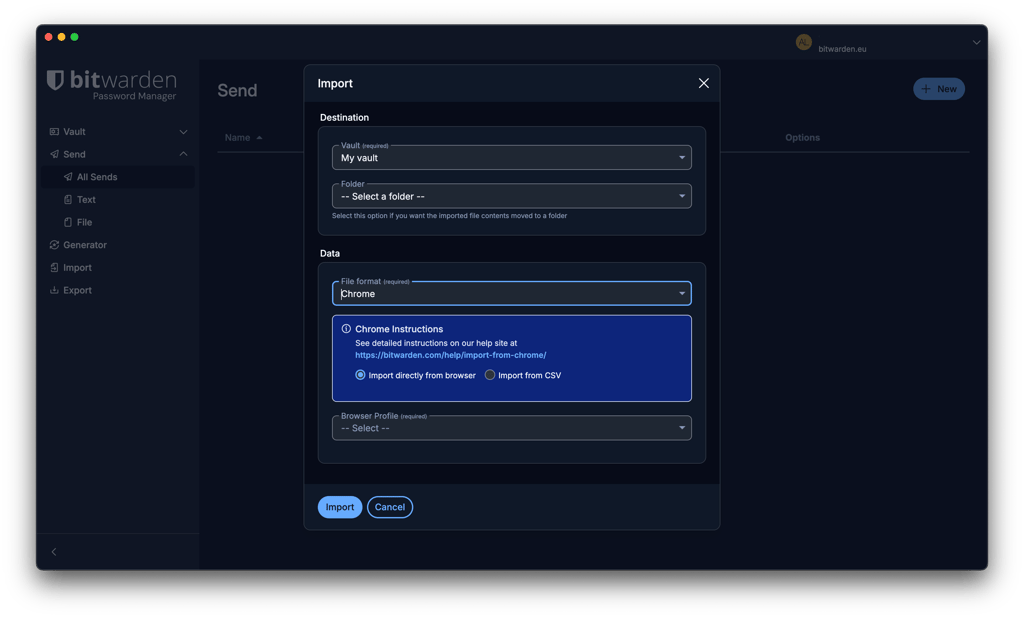
However, a big letdown here is that Bitwarden doesn’t support bulk import for file attachments. Instead, all file attachments must be manually migrated to your Bitwarden vault. Plus, Bitwarden’s importing process is slightly clunkier and time-consuming.
Overall, both password managers get a gold star for offering extensive password-importing options. However, RoboForm has a slight lead because of its more intuitive process.
Account and password recovery
If you’ve lost or forgotten your master password – both RoboForm and Bitwarden are easy to deal with and offer a few helpful recovery methods.
For RoboForm’s paid users, there’s an option to pick an emergency contact who can access your account and download your data. However, the contact must have a RoboForm account. Additionally, if you’ve enabled biometrics on your mobile app, RoboForm lets you use it to restore your password.
As for Bitwarden, account recovery is only possible if specific options are set up in advance. For example, you may log in using a registered encryption-enabled passkey and access it via a trusted device. Alternatively, if you’ve set up a master password hint, you can request for it to be emailed to you. Otherwise, you can appoint an emergency contact to get Read or Takeover access to your vault.
Password generator
To quickly create unique and strong passwords, you need a password generator. This is a standard tool that you can find in most quality password managers’ packages.
With RoboForm’s password generator, you can include or exclude upper and lower case letters, numbers, hexadecimal, and symbols. However, its main appeal is that you can generate up to 512 characters per password.
RoboForm also includes a passphrase generator that lets you adjust the number of words, choose a separator, capitalize words, and include numbers.
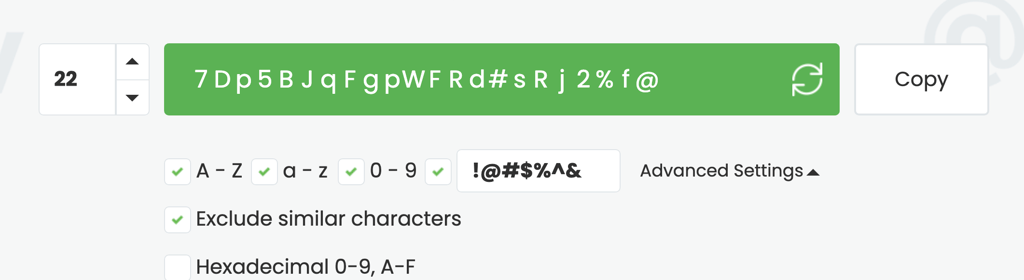
Similarly, Bitwarden’s password generator also allows all sorts of customizations. For instance, you can choose between passwords and passphrases, which are capped at 128 characters and 20 words, respectively.
Bitwarden also includes a username generator that can create random usernames, plus-addressed and catch-all email addresses, and forwarded email aliases through supported services.
Other than that, you can include or exclude capitalizations, numbers, and symbols.
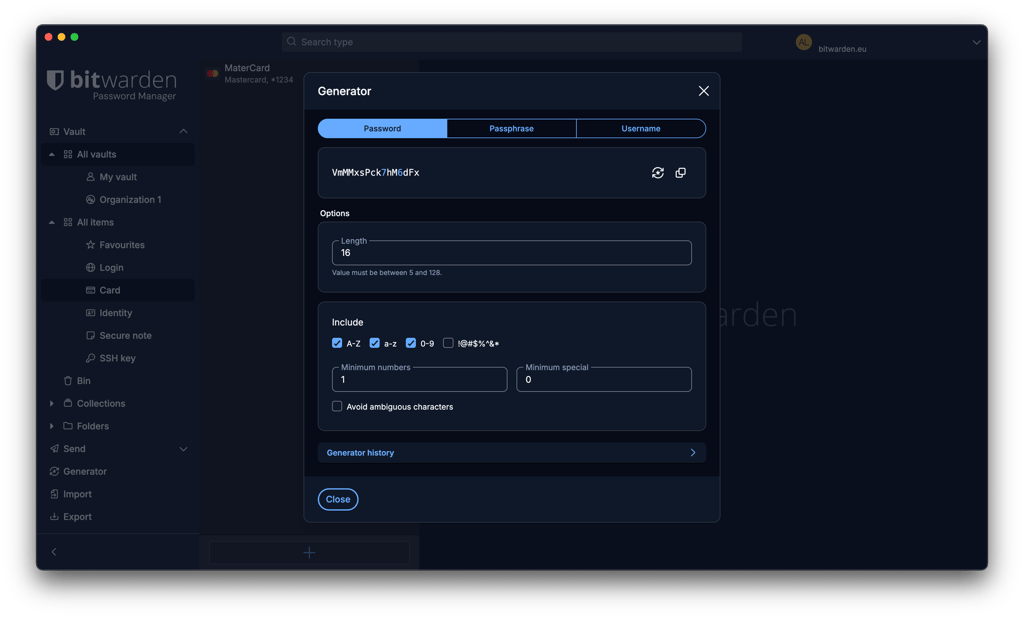
RoboForm’s generator is straightforward and highly customizable, while Bitwarden offers a broader range of generation tools, including usernames and email aliases
Password sharing
Both RoboForm and Bitwarden provide secure password-sharing features, but they take different approaches.
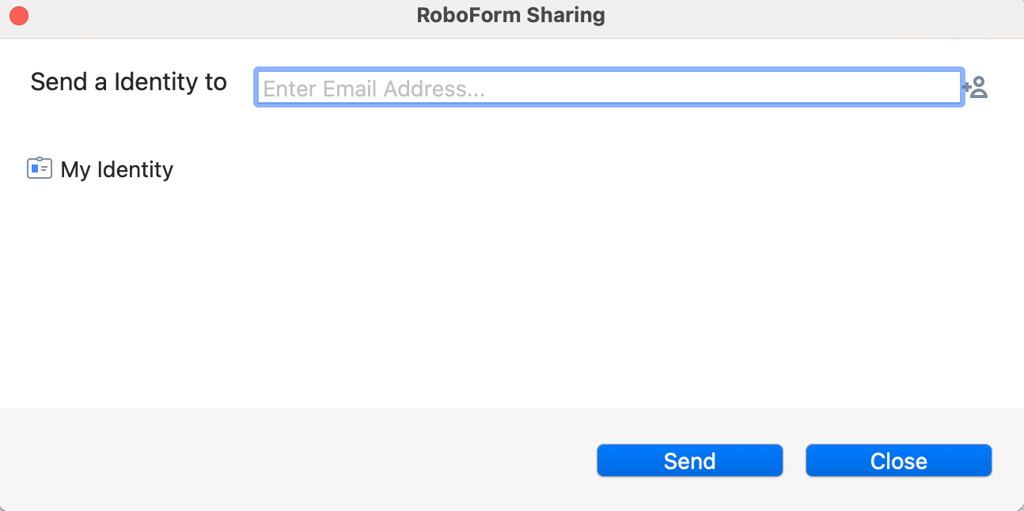
RoboForm lets you securely share individual vault items and folders with other RoboForm users. You can invite recipients by email, revoke access to shared items, and share updates automatically when credentials change. Shared folders also offer different permission levels, including Log in only, Read and write, and Full control. If the recipient doesn't already use RoboForm, they'll need to create a free account to access the shared data.
RoboForm also offers a separate Send feature for transferring a copy of an item. Unlike Sharing, however, access to a sent item can't be revoked and subsequent changes aren't synced to the recipient.
Bitwarden provides both vault sharing and Bitwarden Send. Free users can share vault items with one other Bitwarden user through a free organization. Bitwarden Send, meanwhile, lets users securely send encrypted text to anyone – even recipients without a Bitwarden account. Premium users can also send files and use additional controls such as expiration dates, access limits, and optional passwords.
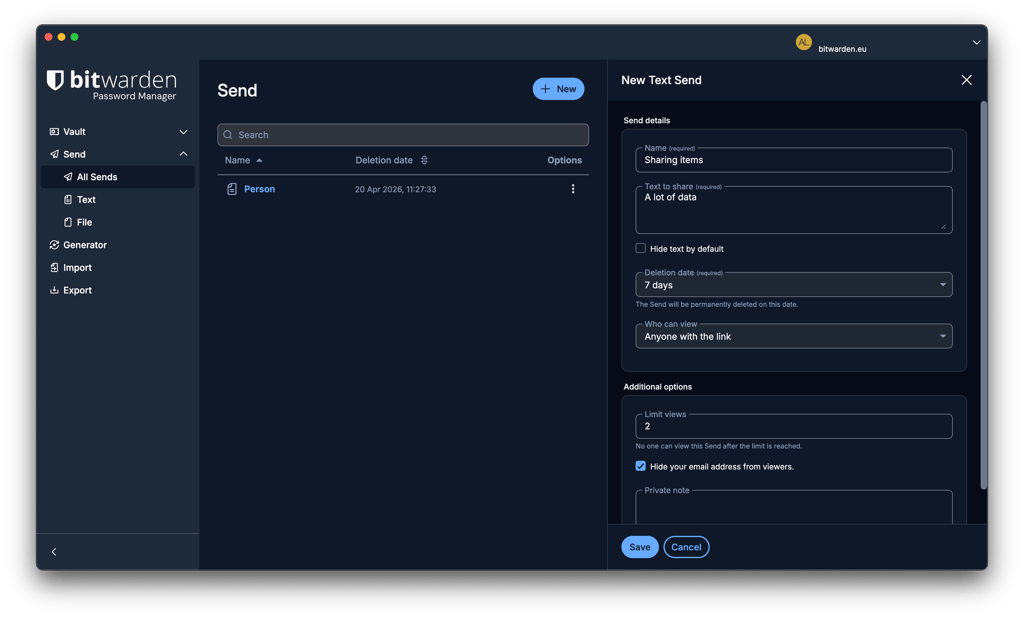
To sum up, RoboForm’s password sharing is considerably more intuitive and flexible, making it one of the more recommended password managers for families. In the meantime, Bitwarden stands out with its flexible Send feature, which even lets free users share data securely with non-users.
Autofill
Both RoboForm and Bitwarden have autofill to make login, payment, and other form-filling processes easier, faster, and more secure. In my testing, RoboForm provided the smoother autofill experience, although Bitwarden now offers several convenient ways to fill saved information.
With RoboForm, its autofill feature takes care of all the heavy lifting on your behalf. Just click on the RoboForm icon, and it’ll fill in all the relevant fields and submit the form for you. It does this for all your login credentials, payment details, personal details, and more.
In comparison, Bitwarden now offers an inline autofill menu that displays matching credentials directly in form fields. You can also autofill through the browser extension, a keyboard shortcut, the context menu, or automatically when a page loads.
Overall, both password managers offer capable autofill, but RoboForm had a slight edge in my testing thanks to its straightforward form-filling experience. Bitwarden has substantially improved its autofill options, but I found RoboForm easier to use consistently for logins and more complex online forms.
RoboForm vs Bitwarden: compatibility and user experience
RoboForm and Bitwarden work with all mainstream operating systems and web browsers. Yet ease of use is where their differences start to show up.
| RoboForm | Bitwarden | |
| Supported OS | Windows, macOS, Android, iOS, Linux | Windows, macOS, Linux, Android, iOS |
| Browser extension | Chrome, Firefox, Opera, Edge, Safari, Tor, Brave | Chrome, Firefox, Edge, Opera, Safari, Vivaldi, Brave, Tor, DuckDuckGo |
| Number of users | Up to 5 | Up to 6 |
Desktop apps
Both RoboForm and Bitwarden offer desktop apps for Windows and macOS. Bitwarden also supports Linux, while RoboForm recommends using its browser extension on Linux systems. Whether you opt for RoboForm or Bitwarden, the installation and setup processes involve just a few clicks when prompted. However, RoboForm has the advantage here because it’s more functional and easier to use.
RoboForm’s desktop apps for the different operating systems all look rather similar to each other. Your app will be minimalistic, streamlined, and intuitive. However, you’ll need a minute to get used to it.
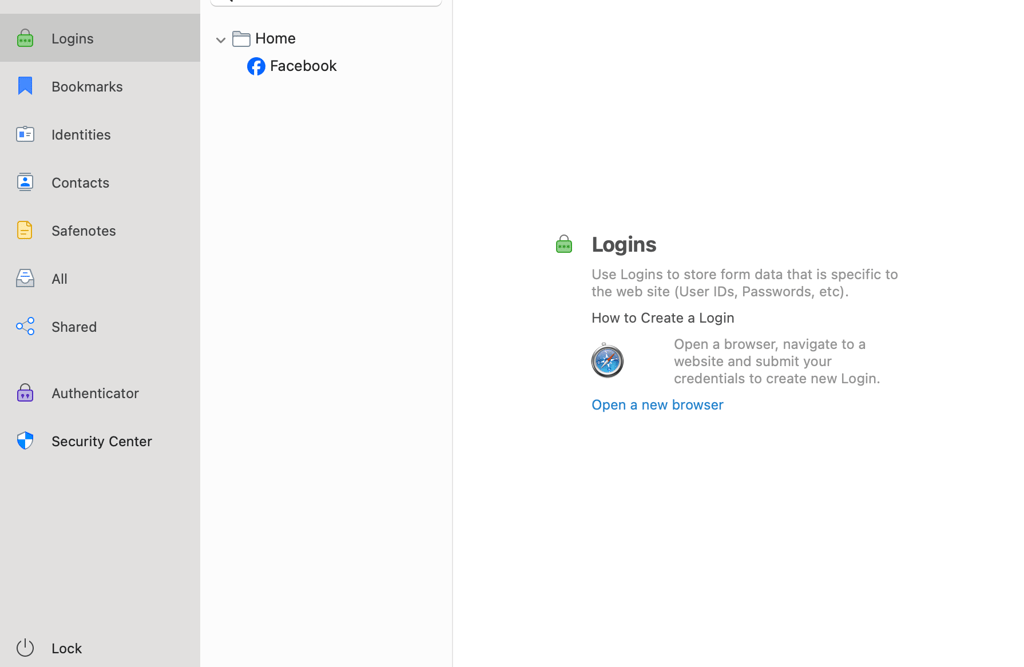
Meanwhile, Bitwarden’s desktop apps look more dated. Bitwarden organizes passwords and other items within its My Vault interface, with search, folders, and vault filters available to help locate saved items. However, I found navigating between some features less straightforward than with RoboForm.
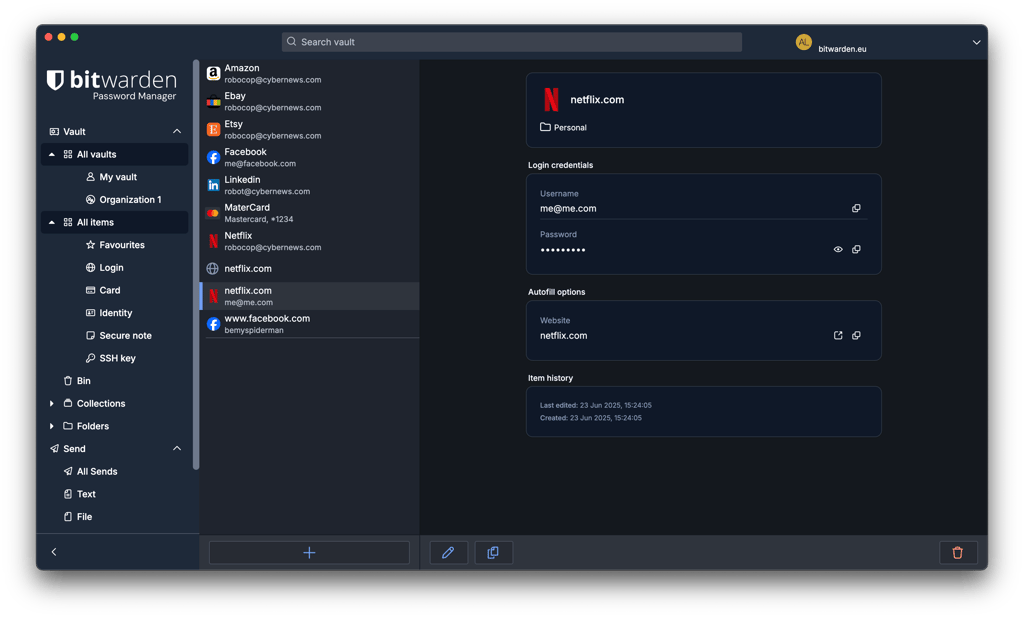
Overall, both password managers’ desktop apps are solid platforms for password management. However, RoboForm’s versions win the day with their ease of use.
Browser extensions
RoboForm and Bitwarden both support major browsers, including Chrome, Firefox, Edge, Safari, and Opera. Both browser extensions are quick to install through the respective browser extension stores, making setup relatively straightforward.
Both providers offer capable browser extensions that handle much of the day-to-day password management experience directly in your browser. Beyond autosave, autofill, and password generation, their extensions provide access to saved vault items, passkeys, and other password-management tools without requiring you to constantly switch to the web app.
Mobile apps
RoboForm and Bitwarden both offer dedicated mobile apps for iOS and Android, available through the Apple App Store and Google Play Store.
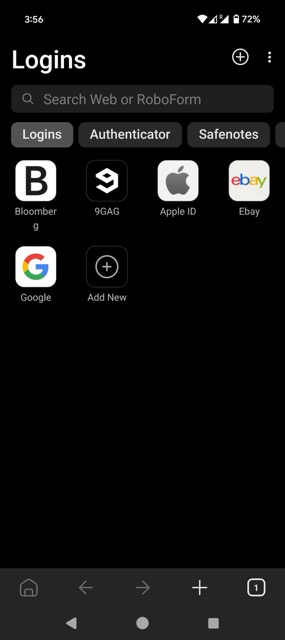
RoboForm provides a fairly consistent experience across its iOS and Android apps. In my testing, the apps felt responsive, straightforward, and easy to navigate. They also go well beyond basic password management, with features including autofill, password generation, secure sharing, Safenotes, Security Center, biometric unlocking, two-factor authentication, and Emergency Access. On newer iOS versions, RoboForm can also generate and automatically save new credentials directly within Safari and supported apps.
Bitwarden’s mobile apps also provide a broad range of password-management features. In addition to autofill, password generation, and sharing, you can manage vault items and folders, switch between multiple accounts, use biometric unlocking, and store and autofill passkeys.
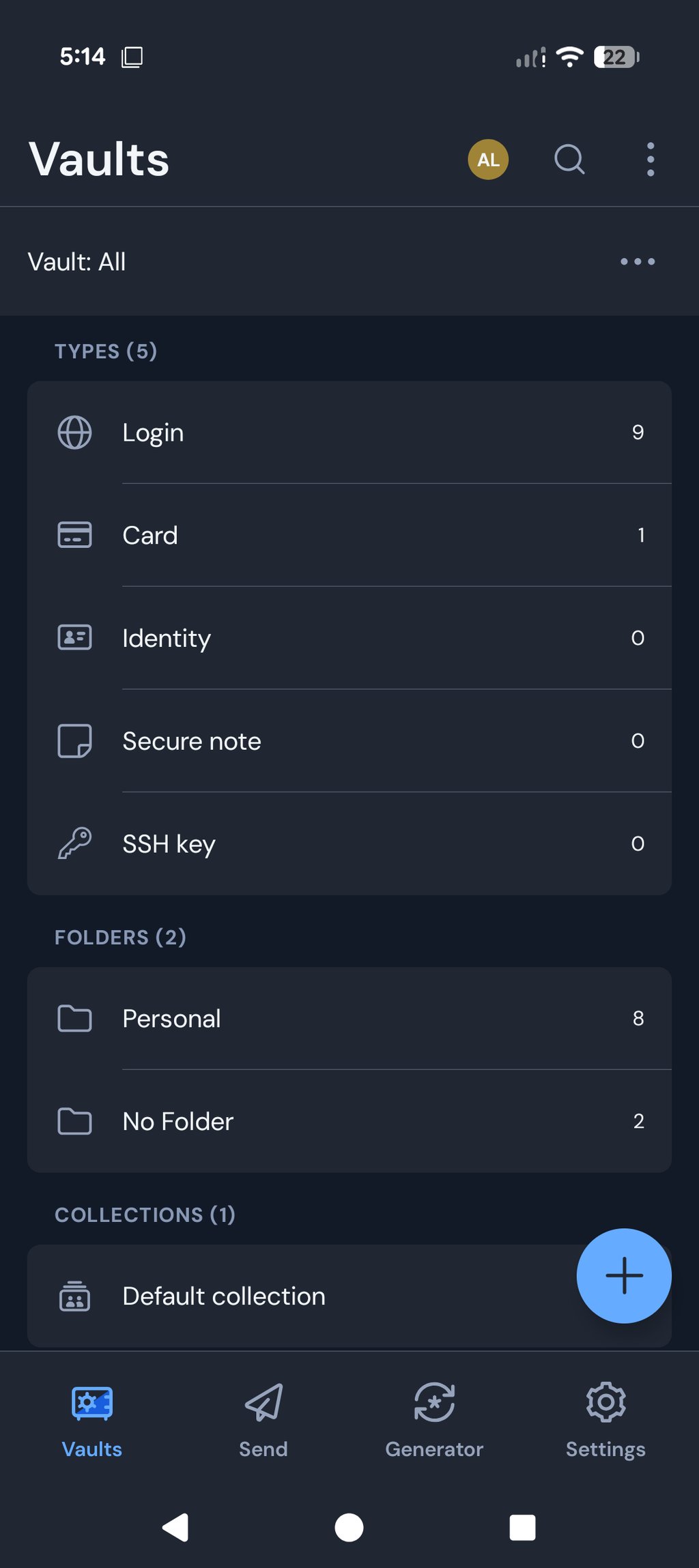
Bitwarden maintains a largely consistent design across iOS and Android, although some functionality differs because of platform-specific capabilities. In my testing, I found Bitwarden’s interface clean and functional, though its design feels simpler and less polished than RoboForm’s.
Customer support
Customer support is an important factor when choosing a password manager, especially if you need quick help with setup or account issues. RoboForm and Bitwarden both offer extensive self-help resources and 24/7 email support, but RoboForm provides more ways to contact its support team directly.
| RoboForm | Bitwarden | |
| Email support | ✅ Yes | ✅ Yes |
| 24/7 live chat | ❌ No | ❌ No |
| Phone support | ✅ Yes | ❌ No |
| Knowledge base | ✅ Yes | ✅ Yes |
| Community forum | ✅ Yes | ✅ Yes |
| Social media support | ✅ Yes | ✅ Yes |
Bitwarden provides 24/7 email support to all users, while paid subscribers receive priority support. It also maintains an extensive Help Center and community forum. However, Bitwarden doesn't offer comparable live chat or phone support for individual users. In my testing, I also found some of its documentation more technical than RoboForm's.
Overall, RoboForm takes the lead for customer support because it offers more direct contact options. Bitwarden provides round-the-clock email assistance and extensive self-help resources, but RoboForm adds live chat and callback-based phone support for users who prefer real-time assistance.
RoboForm vs Bitwarden – which one to choose?
RoboForm and Bitwarden are both solid password managers if you're looking for something secure and affordable. However, RoboForm is the winner of this comparison. It feels easier to use, with smoother autofill and more helpful support – great for day-to-day use.
Bitwarden, on the other hand, is open-source and puts privacy first, which might suit you better if you’re a bit more tech-minded and want something you can customise or trust for its transparency.
More password manager comparisons from Cybernews:
FAQ
Is RoboForm better than Bitwarden?
Yes, RoboForm is better than Bitwarden. Although RoboForm and Bitwarden are equally secure and affordable, RoboForm has more functional features, greater ease of use, and more accessible customer support. Meanwhile, Bitwarden’s features are far more restrictive. Additionally, its lack of real-time support options is also a cause for concern.
Which is better for mobile: RoboForm or Bitwarden?
Both RoboForm and Bitwarden are good for mobile since their apps are responsive and intuitive. RoboForm’s mobile apps are more modern, while Bitwarden’s apps focus on utility. However, one thing to remember here is that both providers’ mobile apps only come with key features for basic password management.
Can RoboForm import passwords from Bitwarden?
Yes, RoboForm can import passwords from Bitwarden. To do so, you first need to export your data as a CSV file from Bitwarden. Then, head over to RoboForm, select the Import option, pick Bitwarden from the listed options, and click the Import button.